Since breaking free of my corporate shackles, I’ve gotten to experiment with a variety of approaches to AI-assisted development. After months of tinkering, I’m quite happy with my current setup, and want to capture and share it.
Things are changing very fast, and I have no illusions that this will be a timeless nugget of wisdom. But talking to some friends and scrolling through X posts, it does seem that I might have some techniques in play that are not widespread. At least, this will be a fond time capsule to look back on as we proceed further into the singularity. And the end state is quite nice: I’ve ended up with the ability to have frontier models fix production bugs from my phone, on a train.
My requirements
After a couple of months with raw Claude Code, it became clear what I was missing:
-
The agents need to be running on Linux. Agentic coding is essentially impossible on Windows, as the agents are heavily trained on Bash and other Unix tools. Although some pretend to have PowerShell support, they invariably trip over themselves on quoting issues, UTF-8 support gaps, etc.
-
I want to be able to work from either my desktop or laptop, with seamless handoff of project progress, including preserving agent sessions, working tree state, and gitignored files (like .env files or build artifacts).
-
I want the work to continue even if I close my laptop to transition locations.
-
I want various user-global settings (e.g., AGENTS.md, skills, harness configurations) to be available no matter where I work, and backed up and version-controlled.
-
I want to be able to review the agents’ current work in Visual Studio Code, not just in their harness UI or as part of a GitHub pull request checkpoint.
-
I want the agents to be able to stand up development servers reflecting their current work for me to poke at. These servers, in some cases, need to be secure contexts, i.e., https: or http://localhost. Ideally, only I should be able to access them.
-
I want to be able to run multiple parallel workstreams on the same project, without the agents stepping on each other’s toes.
-
I want approval interruptions minimized, ideally all the way to --dangerously-skip-permissions / --yolo modes, so that I can run parallel workstreams and step away from the computer. (Spoiler: this means a disposable VM.)
None of these requirements are that hard, and several of them synergize. It’s just a matter of finding and stitching together all the right tools, with a minimum of fuss. I’ll outline my setup below, although not as a step-by-step guide. Since you have agents now, you can ask them to do the fiddly parts.
The key ingredients
Summary: The biggest unlocks are using Tailscale and a dedicated Linux VM running on my always-on home desktop. If you combine this with various features of the ChatGPT desktop app (formerly known as Codex), you’ve basically got it. Some extra goodies come from using Portless and chezmoi.
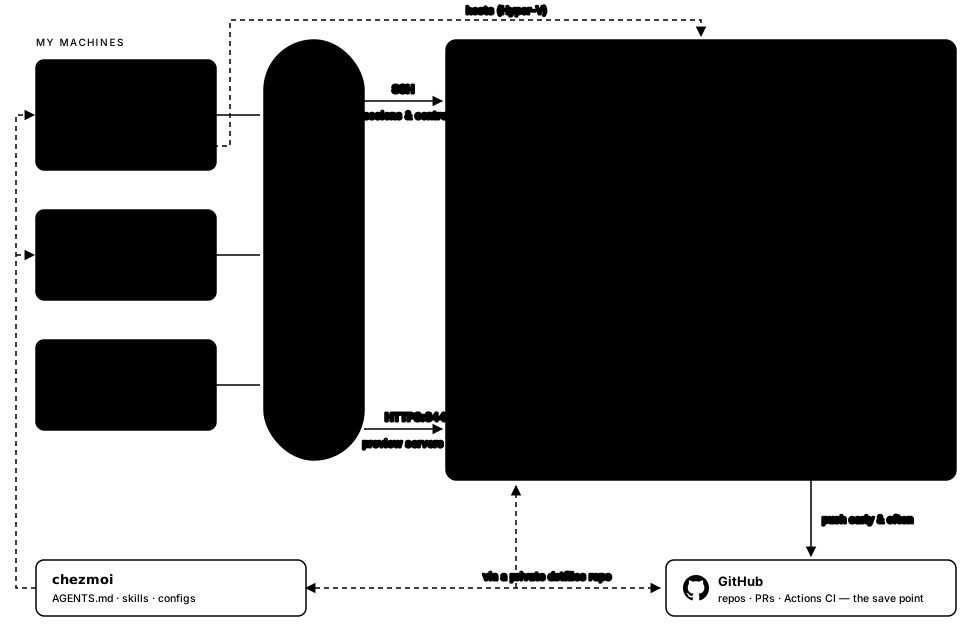 The whole setup, as diagrammed by Claude Fable 5.
The VM and Tailscale
First, we need a disposable Linux VM. You could use a cloud-hosted one, but I keep my desktop running all the time anyway, so I just set one up using an Ubuntu Server ISO. Give it a good chunk of RAM and disk space, and be sure to enable nested virtualization support, as we want agents to be able to spin up their own containers or VMs as necessary.
(You might think that Ubuntu Server could be limiting, compared to Ubuntu Desktop, since without a GUI, you couldn’t log in to websites or take screenshots of work under development. This has not proven to be a problem for me in practice, as agents are perfectly capable of installing and using tools like Playwright or Xvfb when you ask them to perform tasks that need such things.)
At first, the VM is a bit annoying to access. We want to be able to SSH into it, both to streamline initial setup and as part of our grand plan. This is where Tailscale comes in.
Tailscale is a wonderful piece of software which I had not known about until this adventure. It ties together all of your machines—in my case, my desktop, my laptop, and my Linux VM—into a private network, where they can access each other by hostname over SSH, HTTP(S), etc. So even if I’m out at a coffee shop on some random Wi-Fi, I can run ssh agents-base and I’ll be inside my VM, working with my agents. Or I can access https://agents-base.tail234567.ts.net:8443/ to check out the web server my agent has spun up for me. And since SSH is the foundational technology for various other parts of our stack, such as the agentic harnesses themselves and VS Code, Tailscale’s “magic SSH across the internet” makes everything else just work.
(Also, it’s free! They have a neat article explaining why it stays free.)
So immediately after setting up the VM, install Tailscale on it and on all your other machines. Then you can SSH in and set up your dev environment by installing the usual tools. Or, install Claude Code / Codex CLI and ask them to install anything they anticipate needing.
My Tailscale configuration is close to stock, but I have made the following customizations:
-
I’ve enabled Tailscale SSH on all machines, changed the rule from "check" to "accept", and disabled key expiry, to avoid frequent reauthentication. (You can choose to enable Tailscale SSH only on the VM, if you don’t need your agents on the VM to ever grab files from the client machines.)
-
I’ve enabled HTTPS certificates, so that the agents’ dev servers can be secure contexts.
-
I’ve set up Taildrive support, to make it easier to move files between machines from my Windows clients.
The agent harnesses and clients
Next, we need to get the agent harnesses installed and configured on both the VM and the client machines. On the VM, this means Claude Code and Codex CLI. (Let’s face it, nothing else is at the frontier.)
The client is where it gets more interesting. Back when I was still addicted to Claude Code, I spent some time using it directly over SSH, and then introducing tmux to keep the sessions running in the background even after my SSH session disconnected (e.g., because I closed my laptop lid). But I found this quite clunky. tmux required a good amount of fiddling before I got acceptable behavior for things like scrolling and window resizing, and even then it would often glitch in strange ways, e.g., trashing my client terminal after disconnection, or behaving poorly when both my laptop and desktop were trying to tmux into the same Claude Code session.
Fortunately, there is a better solution: the desktop Claude and ChatGPT apps. They both have modes where they act as thin clients, while the agent, its sessions, and your code all live on a remote machine such as our VM.
The real winner here is the ChatGPT app. Its SSH support is extremely smooth. It has a native understanding that you might be working either locally or remotely, e.g., in how it partitions its Settings screen. It handles disconnections gracefully. The only suboptimal part is that the list of projects and sessions doesn’t sync perfectly between multiple clients accessing the same remote VM, but I can usually get them to sync with some jiggling, e.g., starting a new remote session in the right folder will cause the rest to appear in the sidebar.
The Claude app is much less pleasant, unfortunately. I can never figure out whether it’s trying to work over SSH, or over their internet-based Remote Control protocol, or some combination. Sessions do not synchronize at all, so if you want session handoff, you need to revert to the tmux approach. Similarly, even remote sessions, if initiated from the desktop app, die in a storm of failures if you close the desktop client. There’s no native grouping by filesystem folder, so you have to manually create “projects” in the sidebar and move your sessions into them. Overall, it feels like the Claude client teams are focused on Claude Code (the CLI), and are treating the desktop app as something for non-coders. But, when I posted this to X, an Anthropic engineer said that’s not the case, so hopefully it will improve over time.
Security posture and blast radius
So. We want the agents to be as autonomous as possible, with no approvals needed. This means editing ~/.codex/config.toml to contain
approval_policy = "never"
sandbox_mode = "danger-full-access"
and ~/.claude/settings.json to contain
{
  "permissions": {
    "defaultMode": "bypassPermissions"
  },
  "skipDangerousModePermissionPrompt": true
}
I also strongly recommend putting your user in the sudoers file. This allows the agents to install and configure new tools on the VM without friction. (Don’t know how to do this? Ask the agents.)
Additionally, I suggest installing the gh CLI, and logging in with your credentials, so that your agents can do things like manipulate private repositories, open pull requests, nurse your GitHub Actions CI runs, and use the GitHub API to grep through other repositories without rate limits.
Is this safe? No, not really. With these configurations, the agent could start deleting your GitHub repositories, uploading your gitignored secrets to the internet, replying to GitHub issues in your name, or accidentally wiping the VM’s entire home directory. Heck, a sufficiently motivated agent could escape the VM and start hacking into servers on the web.
But in practice, it turns out fine. The agents seem to be aligned and non-malicious, for now. The worst that’s going to happen is an accident that messes up the VM and loses all work that hasn’t been uploaded to GitHub, or an overzealous agent misinterpreting a prompt and impacting production. (For example: I said “Let’s send a PR for this and get it merged to main” to ChatGPT 5.6 Sol, and after tabbing back into the app I saw it had done what I asked and merged the PR to main already, instead of doing what I meant and waiting for review.)
If you want to head these off, you can try something like per-project dev containers within the VM, or restricted permissions on the token you grant the gh CLI. But for me, those haven’t yet crossed the cost/benefit threshold.
One thing that does pay for itself, at least in peace of mind, is pushing commits to GitHub early and often. (Using private repositories for some projects.) I like knowing that my work is on someone else’s servers, and will stay there even if the VM gets wrecked. And I get the usual benefits, such as GitHub Actions CI checking my work, and GitHub Pages or Releases deployment for the external world to see my wonderful projects.
Worktrees
Back to the technical stuff.
A lot of people express confusion about Git worktrees. It’s true that managing them yourself might be annoying. But when the agents are doing it for you, including dealing with origin/main syncing, dependency installation, copying over .env files, etc., it’s a breeze. They’re tailor-made for our purpose of allowing multiple agents to hack on a codebase without stepping on each other’s toes.
Better yet, both the ChatGPT and Claude desktop apps have built-in support. When starting a new session in a given project, you literally just tick a box, and now that session is in its own worktree!
![A screenshot of the ChatGPT app's Start in menu, with New remote worktree selected over the Remote and Cloud options. Below, a new session in the domenic.me project has a prompt drafted in the composer.]() The ChatGPT app's location selector includes a worktree as an option.
The ChatGPT app's location selector includes a worktree as an option.
![A screenshot of the Claude app's message composer, showing chips for the agents-base host, the cards project, and the main branch, plus a checked worktree checkbox.]() The Claude app's version: tick the worktree box.
The Claude app's version: tick the worktree box.
One wrinkle here is worktree location. The ChatGPT app’s default, of putting all the worktrees in ~/.codex/worktrees/, works wonderfully. However, the Claude app’s default, of putting them inside the project at .claude/worktrees/, interacts quite poorly with other software:
-
node_modules discovery traverses up the directory tree, so if you’ve uninstalled a dependency inside my-project/.claude/worktrees/cleanup/node_modules/, Node.js-in-the-worktree will still be able to load the old version from my-project/node_modules/.
-
If you use any command that recurses into child directories, like deno task --recursive <task-name>, the command will wander into the Claude worktree too.
-
If you’re using ChatGPT in the same project, it will periodically get confused by the .claude/ folder’s divergent copy of the code, e.g., when files from the Claude worktree show up in rg and find results.
Fixing this to allow a ChatGPT-like configuration seems to be a known feature request for Claude. And Fable tells me there are hacks available involving configuring the WorktreeCreate hook. But for me, it’s just another reason to prefer ChatGPT for most projects, until the Claude Code/Claude app teams sort out their worktree story.
(Note that the Claude desktop app has a “Worktree location” setting, but it is irrelevant for our purposes, since it only applies to local development on the client machine, and is ignored when working on our VM.)
Code review with VS Code
To review the code the agents write, I still like being able to pull up their working tree in Visual Studio Code. The “Review” sidebar in the ChatGPT app is pretty good for small diffs, especially for submitting line comments back to the agent. And a lot of people are vibe-coding their | own cool review-centric apps. But for now I’m sticking with the classics.
The great thing about VS Code is that it has a robust SSH-based remote development system almost built in. Once you have Tailscale SSH installed on both the target VM and your client machine, you just need to add the Remote - SSH extension to your client VS Code. You then get a new “Remote-SSH: Connect to Host…” option in your Ctrl+Shift+P menu that lets you open remote folders basically as if they were local. Even spawning a terminal with Ctrl+Shift+` will create that terminal on the remote host, which is quite convenient for a quick command or two.
Even better, if you’re using the ChatGPT app and working in a remote session, a little button with a VS Code icon will appear in the top right corner of each chat, which directly opens a VS Code instance that’s connected to the VM and opened to the project folder. This is especially convenient because, per the above, the agent is usually working inside a cryptically named ChatGPT-managed worktree folder. (No such luck for Claude, but, you can poke around in the app until it tells you the name of your current worktree folder, and then copy that into the VS Code Ctrl+K,O “Open Folder” menu.)
![A screenshot of a ChatGPT app session, with a VS Code icon button in the top right corner. The agent reports having pushed a commit and verified that the publishing workflow succeeded.]() The VS Code button, top right, opens the session's worktree over SSH.
The VS Code button, top right, opens the session's worktree over SSH.
Dev servers
Next, you’ll want an easy way for your client machines to check out any web servers that the agents are building. At first I did this with port forwarding, but eventually I settled on a less fiddly, more Tailscale-native approach.
In a typical project, you’ll have a command like npm run dev or python -m http.server that starts up a server bound to some 127.0.0.1 port. If the agent runs these commands directly, then the resulting server cannot be accessed outside the VM. You can instead try to bind to 0.0.0.0, which will make the server available to other machines on the network. But it doesn’t feel right to mess with a project’s npm run dev script definition just to satisfy our idiosyncratic development topology. And if you access the server via IP address directly, e.g., http://192.168.0.103:8000/, that is not a secure context, so various web APIs will be unavailable. Also, if multiple agents are working on the same project, they’ll probably all try to use the same port, and get confused and start killing each other’s servers.
Portless is a small CLI intended to solve this. Or rather, it solves an adjacent single-machine problem, but with some hackery we can make it work for our case. If you want the whole backstory, you can read my conversation with ChatGPT, but the end result is that after installing the portless CLI, I created ~/.local/bin/tportless with the contents
#!/usr/bin/env bash
export PORTLESS_TAILSCALE=1
export PORTLESS_PORT="${PORTLESS_PORT:-1355}"
exec portless "$@"
and updated my AGENTS.md (see below) with the section
## Preview servers

When standing up preview servers for the user to work from, don't run `npm run dev` or similar directly. Instead, use the `tportless` wrapper: bare `tportless` runs the project's dev script through the proxy, and `tportless <app-name> <command…>` works for any other server command. This exposes the preview server on the tailnet. Report the Tailscale URL from the tportless output back to the user, instead of the localhost URL.
The result is delightful: the agent finishes some work, spins up a server, usually does some smoke tests using Playwright, and then hands me a URL like https://agents-base.tail234567.ts.net:8443/ where I can check out its work. Other agents in parallel worktrees will spin up servers on their own dedicated ports, with no collisions. These URLs are not accessible outside of the tailnet, so there’s no danger of them getting exploited, or of my nascent projects being leaked before they’re ready.
Syncing with chezmoi
Over time you’ll likely accumulate preferences about how your agents work, or customizations to your agent harness config files, or neato agent skills applicable across multiple projects. Storing these directly in the VM will work, but the VM is supposed to be disposable. And in the rare instance where local development on your client machines is required, e.g., working on a native Windows app, at least some of your configuration will benefit from being synced to the client machines.
This problem of syncing and backing up configurations is a very old one, usually discussed under the name “dotfiles”. (Since, in the Linux world, most of these configuration files use a leading . in their filename.) Apparently the best solution is a piece of software called chezmoi. It’s pretty neat: it supports templates to handle small differences between machines and OSes, syncing via Git, symlinks, and more.
But personally, this is the sort of thing I never would have bothered with … before coding agents. Learning a new CLI and configuring it just so: too much work, when I could get most of the same result with some manual copying and pasting. These days, I just ask ChatGPT:
Set up chezmoi for me on this machine (agents-base), on the SurfacePro11 host, and on the Domenic-Desktop host. Go through all existing dotfiles on each of those hosts, and produce a plausible synthesis, with appropriate platform-specific guards. Be sure to survey ~/AGENTS.md and ~/skills/, and create symlinks from whatever locations Claude and Codex expect to those files. Note that on this machine, Claude and Codex have full permissions, but on other machines, they are restricted, and so we need to conditionally keep the command allowlists, etc. Our destination is a private GitHub repo domenic/dotfiles, which you can create for me.
I love living in the future!
Bonus: phone-based development
It wasn’t even in my original requirements, but phone-based development falls out of this setup almost for free.
Once you install the ChatGPT or Claude mobile apps, they can be configured to control any other agentic harness instances tied to your account. (This is, as usual, a little more fiddly with Claude, requiring you to manually enable the “Remote Control” feature.) If you install the mobile Tailscale client, you can exercise this control from any network, not just your home Wi-Fi.
So this sort of workflow has become a reality for me:
-
Notice a bug in a live, web-facing deployment of one of my projects while on the go. For example, while showing it off to someone at a party.
-
On the train back, open up the ChatGPT mobile app, which connects to my VM over the Tailscale VPN. Start a new remote session in the project’s directory, asking it to fix the bug I noticed.
-
It churns for some time while I scroll X, then sends me a push notification containing a tailnet-accessible URL for a preview server, which I can use to confirm that the bug is fixed. If it’s not, we iterate together for a few turns.
-
Once I’m satisfied, I tell it to open a PR. I skim the diff and merge it from my phone.
-
After a few minutes of GitHub Actions or the Netlify deploy pipeline, the fix has made it to the live site, usually before I make it to my home train station.
![A screenshot of the ChatGPT mobile app, in a session on the agents-base machine. The agent reports validating a mobile layout fix, and after being told to package it all up into a PR, opens a pull request on GitHub.]() Fixing a mobile bug, from mobile.
Fixing a mobile bug, from mobile.
The future! We are living in it!
Recap and remaining gaps
So to recap our ingredients, and how they help us meet the original requirements:
-
A disposable Linux VM gives the agents a non-Windows environment, and allows us to configure them for zero approvals, while being comfortable with the blast radius of that permissive policy.
-
Using Tailscale gives all of our machines access to that VM, no matter what network they’re on, and lets the agents expose secure-context dev servers.
-
Git worktrees and Portless ensure our agents can work in parallel on the same project without stepping on each other’s toes.
-
Visual Studio Code’s Remote - SSH extension lets us review the code in any given worktree the agents have created.
-
GitHub repos serve as a save point for all our projects, in case the VM needs to be reset, and chezmoi lets us sync and back up our AGENTS.md, skills, and other configurations there too.
-
The ChatGPT desktop app gives us easy session handoff and syncing. The Claude desktop app isn’t as good in various ways, so we generally have to resort to Claude Code plus tmux to get that capability.
What could be better?
Well, as mentioned above, this would all be slightly safer with dev containers. Those have other benefits, such as letting you install conflicting global toolsets in each container. Right now I have my AGENTS.md promote the use of fnm and uv, so I haven’t run into many such conflicts, but I could imagine them coming up in the future.
On the user experience side, I generally don’t like how the “session” model in each coding harness is so strongly tied to the folder path on the VM. If you rename or move a project folder, the ChatGPT and Claude apps get confused, and generally lose all your session history in that folder. You can fix this by asking the agent to find the hidden references and update them, but it’s a pain, and needs to be done on both client and host machines.
Similarly, I’d like some way to back up my session histories somewhere durable (like a private GitHub repository). At the very least, I suspect they’ll be good for some nostalgia in a few years. But sometimes the session transcripts are the only record of certain design decisions, or of abandoned approaches that explain why the code looks the way it does.
All of the above are fixable with a little bit of work on my end, e.g., by writing small utilities and wrappers. But I suspect they won’t be truly seamless until they’re built into the harness apps. So, I hope the ChatGPT app team works on them. And that the Claude app team first gets their shit together generally, and then works on these features.
That’s my setup. A disposable VM, a magic VPN, two frontier harnesses, and a few extra tools. If you’re reading this more than six months from now, I assume it’s all quaintly obsolete. But that’s what time capsules are for.
What a time to be alive!